
AI Team Wiki: Internal Knowledge Base
AI Team Wiki
The AI Team Wiki turns your data sources into a private, searchable knowledge portal on a custom subdomain. Your team asks a question in plain language and gets a direct answer instead of a list of pages to read.
It uses the same data sources as your chatbot, so anything you've already indexed — websites, files, Confluence spaces, Notion databases — is instantly answerable internally, with no extra setup.
Find it under Dashboard → your assistant → Channels → AI Team Wiki. The channel card shows the configured subdomain and status. Live chat and human takeover are not available in the Team Wiki.
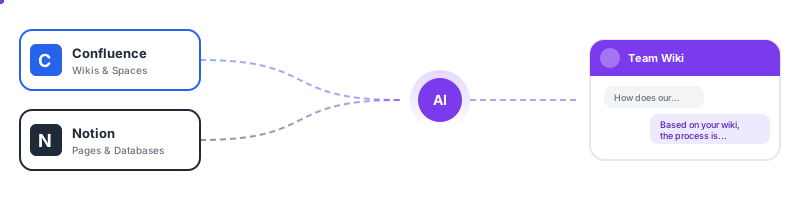
Connect Your Knowledge — Confluence & Notion
Most teams already have their knowledge spread across tools like Confluence and Notion. Instead of manually exporting and uploading content, WebChatAgent connects directly to these platforms and keeps your knowledge base in sync automatically.
Why This Matters
Traditional knowledge management has a core problem: information exists, but finding it is painful. Confluence's built-in search returns a list of pages — your team still has to read through them to find the answer. Notion's search works similarly.
WebChatAgent's AI Team Wiki changes the game:
- Your team asks a question in plain language
- The AI reads across all your connected sources — Confluence spaces, Notion databases, uploaded documents, and websites
- It returns a direct, concise answer with references to the source material
No more scrolling through 20 Confluence pages to find one paragraph. No more guessing which Notion database has the answer.
How It Works
- Connect — Enter your Confluence URL or Notion integration token
- Select — Choose which spaces or databases to import
- Index — WebChatAgent processes your content and creates AI-optimized embeddings
- Sync — Content is automatically re-indexed on your chosen schedule (daily, weekly, or monthly)
Only pages that have changed since the last sync are re-processed, keeping updates fast and efficient.
Confluence Cloud
Connect your Atlassian Confluence instance to import wiki pages, knowledge base articles, and documentation. Select specific spaces or import everything — your choice.
See Knowledge → Confluence Cloud for setup instructions.
Notion
Connect Notion workspaces to import pages and databases. Perfect for teams that use Notion as their internal wiki, project documentation, or company handbook.
See Knowledge → Notion for setup instructions.
Connected folders — SharePoint, Google Drive, Nextcloud, SFTP
Most company knowledge is not in a wiki at all. It sits in a folder: handbooks, process descriptions, price lists, contract templates. Connect that folder once and the wiki answers from it — including the files someone added last week.
The Team Wiki is the place to switch on Name the storage location to users. Your colleagues are allowed to know that the answer came from /HR/Handbook/Onboarding.pdf, and the answer links straight to the file. On a public website widget you would leave that off.
See Knowledge → Connected folders for setup instructions per provider.
Access Control
The Team Wiki supports multiple access modes:
| Mode | Description |
|---|---|
| Password | Anyone with the shared password can access the wiki |
| Team Member Login | Only invited team members can log in (individual accounts) |
| Public | No authentication required |
Wiki-Only Team Members
You can invite team members with only the Team Wiki permission — they get access to the wiki without seeing any backend/dashboard features. This is ideal for giving employees read access to your knowledge base without exposing admin tools.
See Team Members → Wiki-Only Access for details.
Setup
- Open your assistant's detail page
- Select Channels → AI Team Wiki
- Enable the Team Wiki feature
- Configure your custom subdomain (e.g.,
wiki-yourcompany.webchatagent.com) - Choose your access mode (password, team login, or public)
Customization
Tailor the wiki to match your brand:
- Logo — Upload your company logo
- Theme Color — Match your brand colors
- Welcome Message — Set a custom greeting for your team
Shared Data Sources
The Team Wiki uses the same data sources as your chatbot. Any content you add — website URLs, documents, files, Confluence spaces, or Notion databases — is immediately available in the wiki. No duplicate management needed.
Use Cases
- SOPs & Processes — Instant access to standard operating procedures from Confluence or Notion
- HR FAQs — Answer common employee questions about policies and benefits
- Onboarding — Help new hires find information across all your internal docs instantly
- Compliance — Provide easy access to regulatory and compliance documentation
- IT Support — Self-service answers for common technical issues
- Sales Playbooks — Equip your sales team with product knowledge and objection handling
- Engineering Docs — Make technical documentation from Confluence searchable with natural language
- Company Handbook — Turn your Notion handbook into an interactive Q&A assistant